
The ability to quickly extract key information from lengthy PDF documents is an invaluable skill for students, professionals, and researchers alike. As the volume of written material continues to grow, utilizing artificial intelligence to summarize PDF content becomes essential for enhancing productivity and deepening comprehension. This article will explore various techniques and tools that automate the summarization process, enabling you to grasp critical points with ease and confidence. Join us as we delve into this exciting intersection of technology and learning.
Article · Summarize Pdf Ai
How to Summarize PDF With AI for Efficient Learning
Discover how to summarize PDF using AI tools to enhance productivity and comprehension. Unlock the secrets of effective information extraction.
Understanding PDF Formats
PDF, or Portable Document Format, is widely used for sharing documents because it retains the formatting and layout across different devices. This consistency makes PDFs popular among academic, business, and legal professionals. However, navigating the dense text and lengthy pages often poses a challenge for readers seeking to extract meaningful information quickly. Understanding the structure of a PDF is the first step in learning to summarize its contents efficiently. Artificial intelligence tools are emerging as powerful allies in this aspect, enabling users to distill essential information from PDFs without the need for extensive manual reading.
The Importance of Summarization
Summarizing is the process of condensing information while preserving critical concepts and ideas. For students and professionals, summarization skills can make a significant difference in how they digest information. Key benefits include improved retention of information, better time management, and stronger comprehension of complex topics. Learning how to summarize PDFs using AI tools can lead to enhanced productivity and more effective study or work sessions.
An effective summary captures the primary ideas and arguments presented in a document, providing a clear roadmap of the text's message. With AI, the summarization process can be automated, transforming lengthy documents into concise summaries, which make it easier for readers to focus on what truly matters.
Types of AI Summarization Techniques
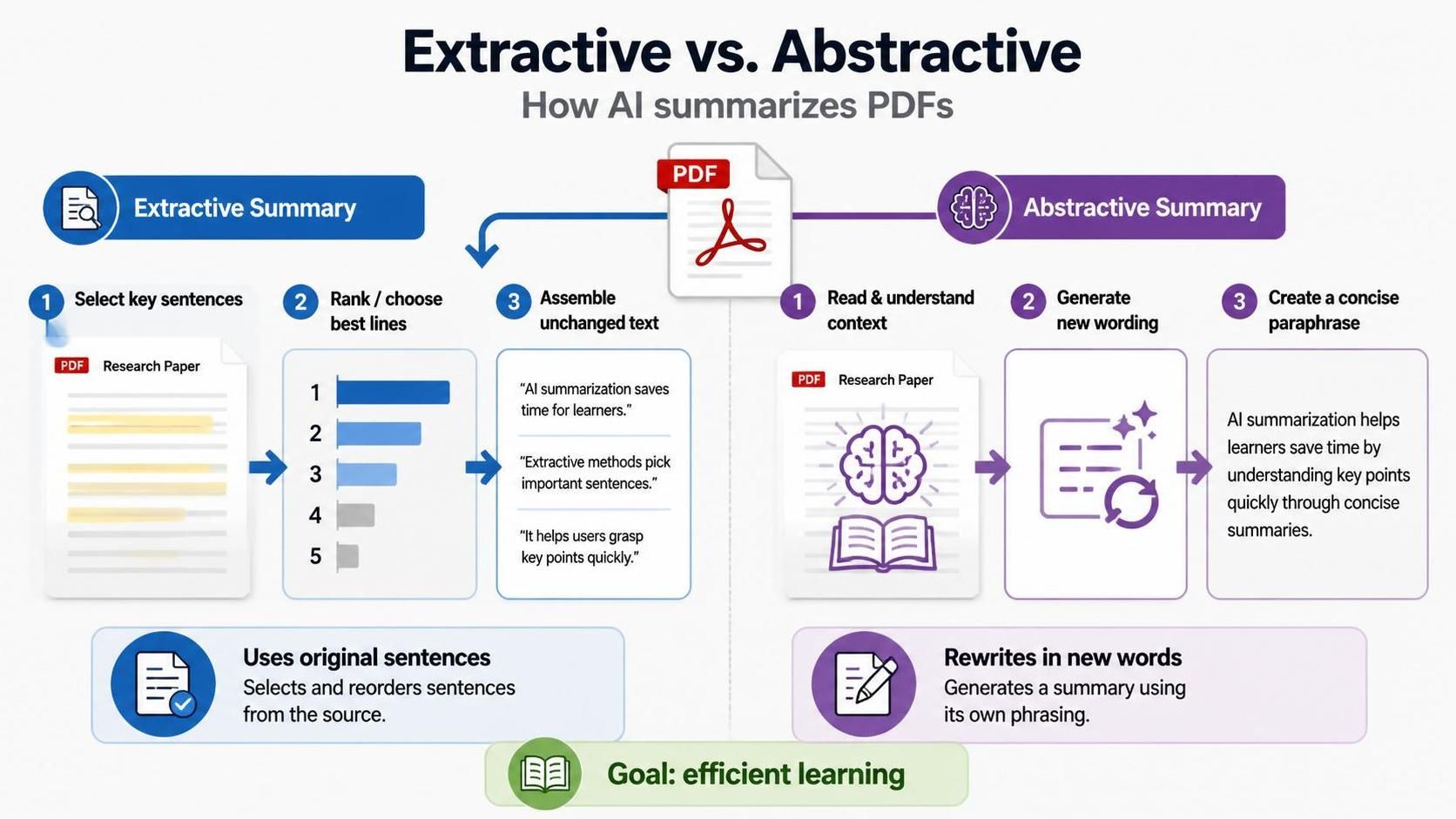
AI summarization can be broadly categorized into two main techniques: extractive and abstractive summarization. Understanding the difference between these methods is essential in selecting the right tool for your summarization needs.
Extractive summarization identifies and extracts key sentences or phrases from the original text to create a coherent summary. This method is particularly useful for retaining the original wording and tone of the document, making it ideal for academic writing or formal reports.
On the other hand, abstractive summarization generates new sentences that encapsulate the main ideas of the original text. This form of summarization often leads to more succinct and readable outputs, as it doesn’t rely on the exact wording of the source material. It's beneficial when a more conversational or fluid summary is required, or when dealing with complex concepts that necessitate rephrasing.
Popular AI Tools for Summarizing PDFs
Numerous AI tools cater to the need for effective summarization of PDFs, helping individuals efficiently process lengthy documents. Below are some notable tools that can assist with this task:
1. Adobe Acrobat Pro: Known for its comprehensive PDF editing capabilities, Adobe Acrobat Pro also includes a summation tool that applies AI to help users extract key points from documents easily. Its robust features allow for tweaking summaries based on user preferences. This is particularly useful for business professionals who may need tailored summaries.
2. SummarizeBot: This online tool offers a straightforward interface for summarizing PDFs along with a variety of other files. It employs both extractive and abstractive methods, providing flexibility depending on the user's requirements. Accessible through a web browser, it pairs user-friendliness with effective summarization performance.
3. Sumnotes: Sumnotes specializes in summarizing annotations made on PDFs. Ideal for scholars who take extensive notes, Sumnotes helps compile these notes into structured summaries, making subsequent review and study sessions more streamlined.
4. Resoomer: Resoomer is a versatile online tool that caters to summarizing articles and reports but excels with PDF documents as well. With a focus on providing summaries of argumentative texts, it allows users to input their PDFs and receive concise overviews in seconds.
How to Use AI Tools for Effective Summarization
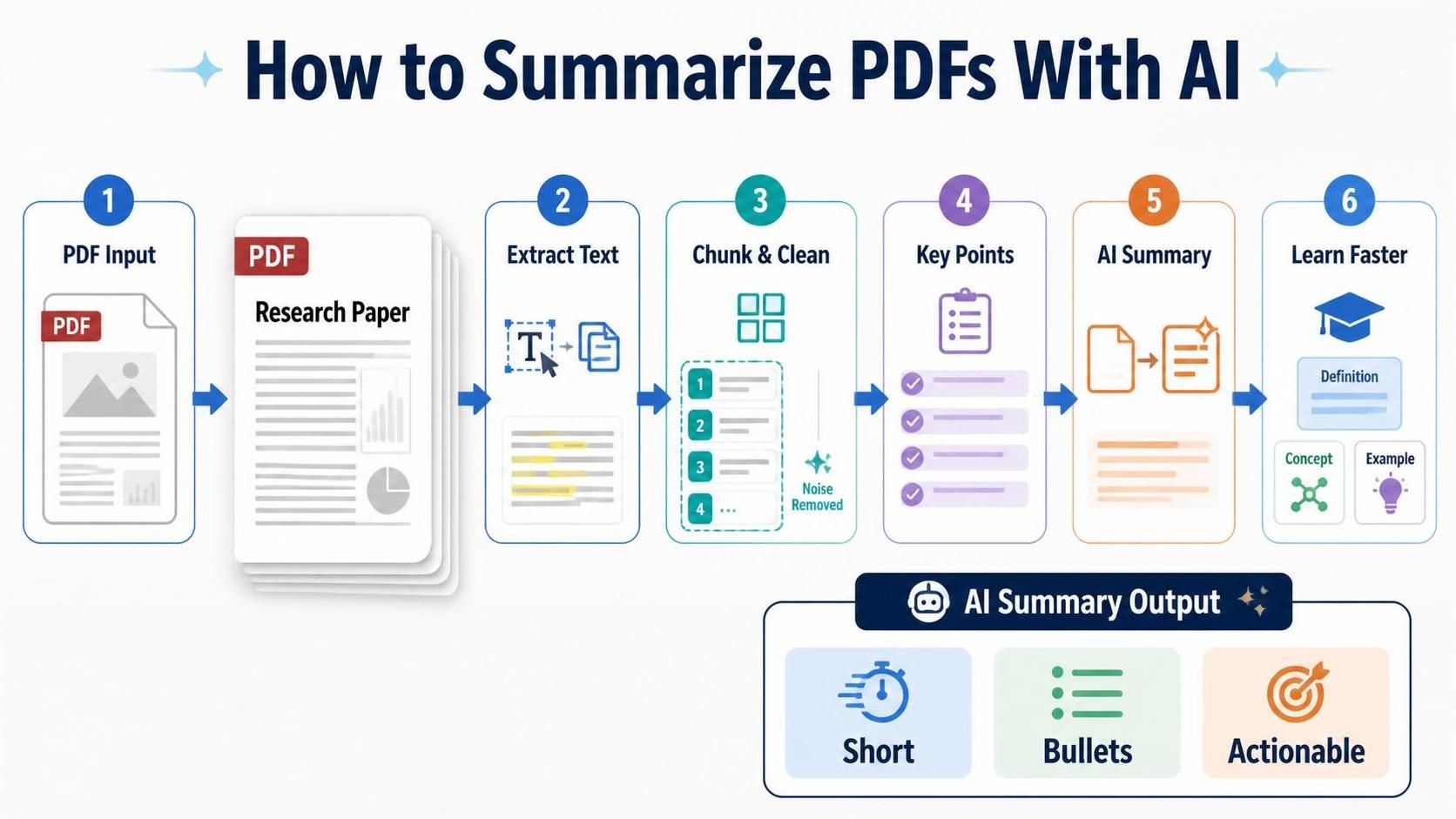
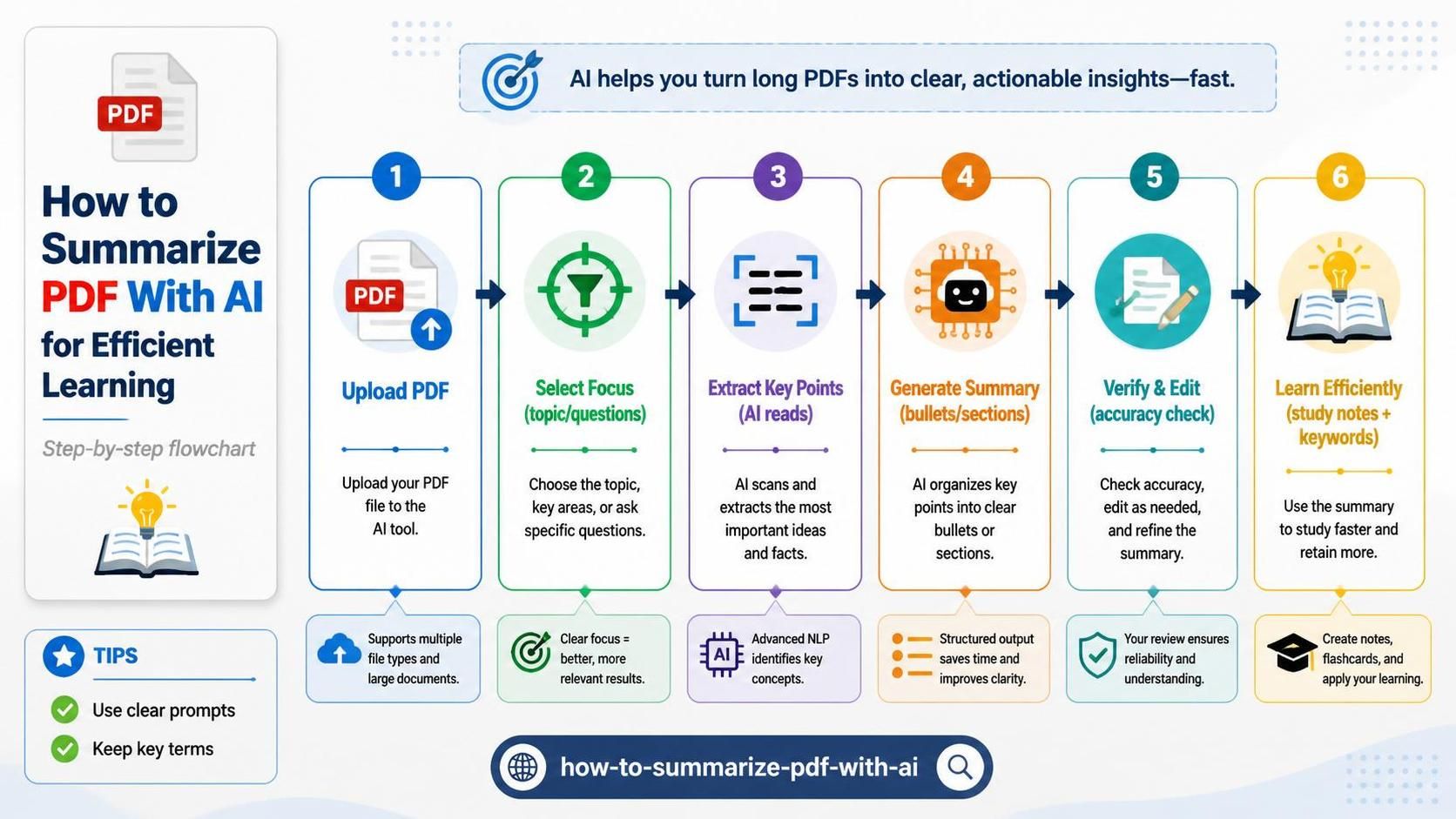
Using AI tools for summarizing a PDF is generally a straightforward process. Below are the steps to achieve an effective summary using AI:
1. Select the Right Tool: Choose an AI summarization tool that fits your specific needs, considering factors such as the type of document, your preferred summarization style, and the software's compatibility with PDF files.
2. Upload Your PDF: Most AI tools will require you to upload the PDF file you wish to summarize. Ensure the document is clear and legible, as this will influence the quality of the output.
3. Customize Settings (if applicable): Depending on the tool, you may be able to adjust settings like the desired length of the summary or the focus points. This customization can help refine how the summary aligns with your objectives.
4. Generate the Summary: After inputting your preferences, initiate the summarization process. The tool will analyze the PDF and automatically produce a summary for you to review.
5. Review and Edit: Once generated, review the summary carefully. While AI tools are powerful, they may not always capture nuances accurately. Editing the summary ensures clarity and coherence in alignment with your understanding of the original material.
6. Save and Utilize: After finalizing the summary, save it in your preferred format for future reference. Utilize the summary in your studies, presentations, or reports as needed.
Challenges and Limitations of AI Summarization
While AI summarization offers new possibilities for efficiency and understanding, it is not without challenges. Users should be aware of the following limitations:
1. Context Understanding: AI might struggle to grasp complex context or nuanced meanings, leading to summaries that lack depth in certain areas.
2. Source Reliability: If the PDF contains inaccurate or biased information, the summaries generated will carry those flaws. Thus, critical assessment of the source material is necessary.
3. Over-Simplification: At times, AI tools oversimplify content, resulting in summaries that miss essential details. Users must ensure that critical points are retained in the summaries they generate.
4. Tech-Savvy Needed: Some users may find it challenging to navigate new AI tools, which can impede efficient summarization if one does not invest the time to familiarize themselves with the technology.
5. Potential Cost: Certain advanced tools may require a subscription fee, which could be a barrier for some users.
Awareness of these challenges can assist users in choosing the right tool and mitigating potential issues during the summarization process.
Enhancing Summarization Skills
While AI tools offer support in summarizing PDFs, developing personal summarization skills remains valuable. Here are strategies to strengthen your summarization abilities:
Practice Active Reading: Engage actively with the text by highlighting key points, taking notes, and summarizing sections in your own words as you read. This fosters a deeper understanding and retention.
Outline Main Ideas: Before summarizing, outline the primary arguments, evidence, and conclusions presented in the document. A clear outline can guide the summarization process and highlight areas requiring further focus.
Utilize Digital Tools: In addition to AI tools, consider using digital notes or mind-mapping applications to visually organize and summarize your thoughts. These techniques can aid memory retention and comprehension of complex information.
Peer Review: Collaborate with peers in your academic or professional field to review each other's summaries. This can provide different perspectives and insights, enhancing the overall quality of the summaries produced.
By combining AI tools with personal skills, individuals can refine their summarization capabilities and bolster their productivity when dealing with extensive documents.
Frequently asked questions
The purpose is to efficiently extract and condense meaningful information from lengthy PDF documents, enhancing comprehension and productivity.
The two main techniques are extractive summarization, which extracts key sentences from the text, and abstractive summarization, which generates new sentences to capture the main ideas.
AI may struggle with complex contexts and nuanced meanings, potentially leading to summaries that lack depth.
Many AI tools allow you to adjust settings such as the desired length of the summary and specific focus points to tailor the output to your needs.
Adobe Acrobat Pro is a popular tool that offers comprehensive PDF editing features along with AI-powered summarization capabilities.
You should review and edit the summary to ensure it captures essential points accurately, as AI may oversimplify content.
You can enhance skills by practicing active reading, outlining main ideas, using digital tools for organization, and collaborating with peers for feedback.
Some AI tools may have a learning curve, making it important to familiarize yourself with their functionalities for efficient summarization.
Challenges include potential misunderstandings of context, the quality of source material, oversimplification of content, and the need for technical familiarity.
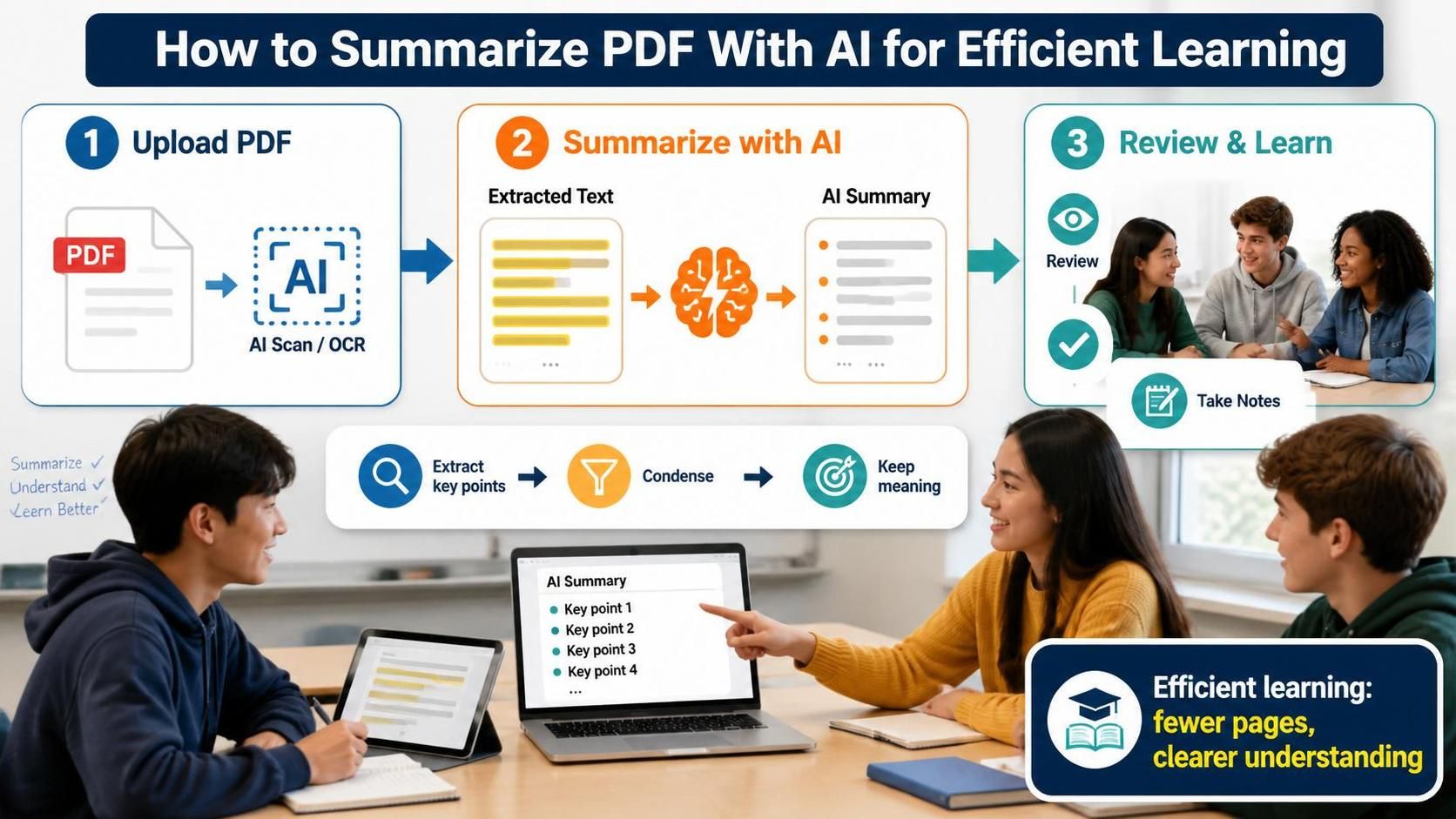
AI summarization improves learning efficiency by allowing users to quickly access key points from dense and lengthy documents, ultimately saving time and enhancing comprehension.